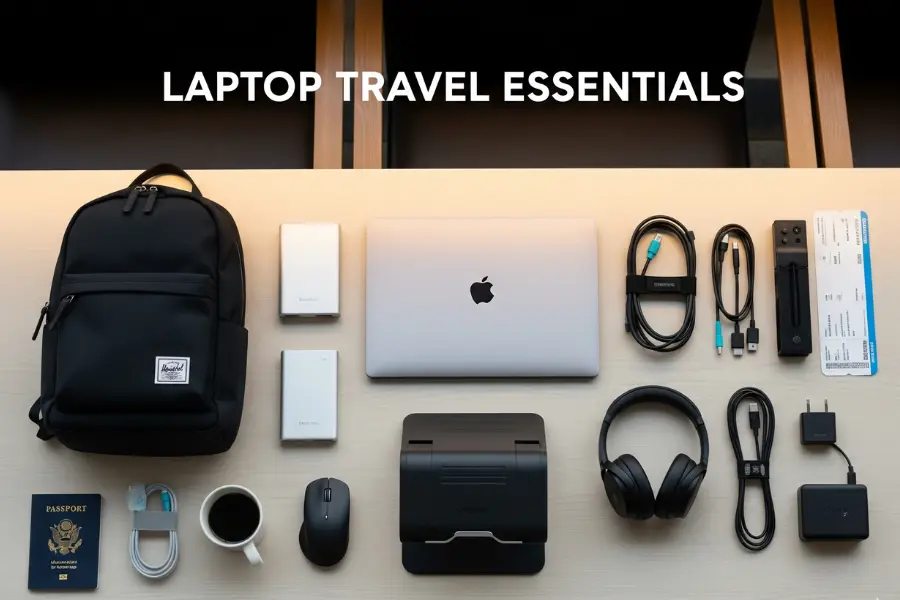
A laptop is the most expensive and most fragile thing most people travel with, and it depends on a surprising number of small companions to be useful on the road. Without the right plug, it dies in a hotel room abroad. Without a sleeve, it picks up a cracked corner in an overhead bin. Without a stand and a mouse, a week of working from hotel desks leaves you hunched and sore. The good news is that the kit you need is small, and most of it costs far less than a repair. This guide covers the ten laptop travel accessories from our original list, what each one actually does, what to look for when you buy, which ones matter for which kind of trip, and the rules that apply to batteries and chargers when you fly. It is part of our travel gear series, which starts with our main guide to choosing travel luggage.
The short answer
If you only buy three things, make them a padded sleeve or a bag with a proper laptop compartment, a plug adapter for the countries you visit and a cable pouch that keeps your charger, cables and adapters in one place. Add a power bank that can charge your laptop over USB-C if you work in airports or on trains, and a folding stand plus a compact mouse if you work from hotel desks for more than a few days. Everything else, from cooling pads to anti-theft backpacks, depends on how and where you travel. Before any flight, remember the one rule that is not optional: power banks and spare lithium batteries travel in the cabin, never in checked bags.
Start with how you travel
The right kit for a weekend city break is very different from the right kit for a month of remote work. Three questions narrow it down quickly:
- How many hours a day will you work? An hour of email needs almost nothing. Full workdays from hotels, cafés and coworking spaces justify a stand, a mouse and possibly a travel keyboard.
- Where will you plug in? Domestic trips need no adapter. International trips need the right plug for each country, and long travel days with no outlets need a power bank.
- How will you carry it? A backpack, a rolling bag or a suitcase with a laptop pocket each changes which protection and organization accessories make sense.
The ten laptop travel accessories
1. Travel laptop backpack
A good travel laptop backpack puts the computer in a padded compartment against your back, keeps chargers and cables organized in their own pockets and spreads the weight across both shoulders. For travelers it is often the single most useful accessory because it is both protection and luggage. Look for:
- A suspended or raised laptop compartment, so the laptop does not hit the ground when you set the bag down.
- A clamshell or wide opening that lets you reach the laptop at security without unpacking everything.
- A luggage pass-through strap to slide the bag over a suitcase handle.
- Dimensions that fit your airline’s personal-item limit if you want it under the seat, or the carry-on limit if it is your main bag.
If the backpack is also your main luggage, our guide to the Peak Design Travel Backpack 45L explains how to choose and pack a carry-on travel pack.
2. Slim laptop sleeve
A sleeve is the cheapest insurance you can buy for a laptop. It adds a layer of padding when the computer goes into a tote, a suitcase or a bag without its own compartment, and it lets you carry the laptop on its own into a meeting or a café. Choose a sleeve sized to your laptop’s actual dimensions rather than just the screen size, with padding on the edges and corners, since that is where drops do the most damage. Water-resistant fabric and a zipper that does not scratch the lid are worth having. A sleeve with a small front pocket for the charger turns it into a minimalist laptop bag for short trips.
3. Adjustable laptop stand
Hotel desks, café tables and airport counters put your laptop screen far below eye level, which means hours of looking down. A folding stand raises the screen closer to eye level, and most fold flat or into a small tube for packing. The catch is that once the laptop is raised, its own keyboard is too high to type on comfortably, so a stand works best with a separate keyboard and mouse. Look for a stand that is light, folds small, locks at several heights and feels stable when you type. It can also help air circulate under the laptop on a hot day.
4. Portable laptop charger (power bank)
A power bank that can charge a laptop keeps you working through long layovers, train journeys and flights without a working seat outlet. Not every power bank can charge a laptop, so check these points:
- USB-C Power Delivery output with enough wattage for your laptop. The laptop’s own charger shows its wattage; a power bank with much lower output may charge slowly or only slow the drain while you work.
- A watt-hour rating printed on the case. Airline and security rules are based on watt-hours, not the milliamp-hour number in the marketing. If only mAh is listed, you can estimate watt-hours as mAh multiplied by the battery voltage, divided by 1,000.
- Size and weight. Laptop-capable power banks are heavier than phone ones. Carry the smallest one that gets you through a typical travel day.
The flying rules for power banks are covered in detail below. The short version: cabin only, under the common 100 Wh threshold unless your airline approves a larger one, and protected from short circuits.
5. Waterproof laptop bag
Rain is the most common way travelers damage laptops without dropping them: a dash from a taxi to a hotel, a ferry deck, a sudden storm while sightseeing. A bag with water-resistant fabric, covered or coated zippers and a padded compartment keeps the laptop dry in ordinary weather. Truly waterproof bags with roll-top closures exist, mainly for outdoor and adventure travel, but for most trips water resistance plus a sleeve inside is enough. Whatever the bag claims, do not leave a laptop bag sitting in a puddle or on a wet boat deck.
6. Anti-theft laptop backpack
Anti-theft backpacks hide the main zipper against your back or let you lock it, add a hidden pocket for your passport and cards, and in some cases use cut-resistant fabric and straps. They make quick pickpocketing and grab-and-run theft harder, which is useful in busy cities, on crowded transit and in cafés where a bag sits on the floor. They are not theft-proof, and habits matter as much as features. Our full guide to anti-theft backpacks explains which features are worth paying for and which are marketing.
7. Cable organizer pouch
A cable pouch is the accessory that saves the most frustration for the least money. It keeps the laptop charger, phone cables, adapters, earbuds and a spare USB stick in one place, so you can pull them all out at a hotel desk and put them all back at checkout. It also makes security easier, since a tangle of loose cables around a laptop is more likely to need a second look. Choose a pouch with elastic loops or small mesh pockets, a zipper that opens wide and a bright interior color so you can see what is inside. Before a trip, pack it and check it against a list: laptop charger, phone cable, watch charger, plug adapter, power bank cable.
8. Laptop cooling pad
Cooling pads use one or more fans to push air under the laptop. They make the most sense for gaming laptops and powerful machines that run hot under sustained load, or for working in very warm rooms without air conditioning. For most travelers and most laptops, a cooling pad is optional; keeping the vents clear and working on a hard, flat surface rather than a bed or a sofa does most of the job. If you do pack one, choose a slim, light model that runs from a USB port, and remember it adds bulk. A folding stand that lifts the laptop off the table gives some of the same airflow benefit with less to carry.
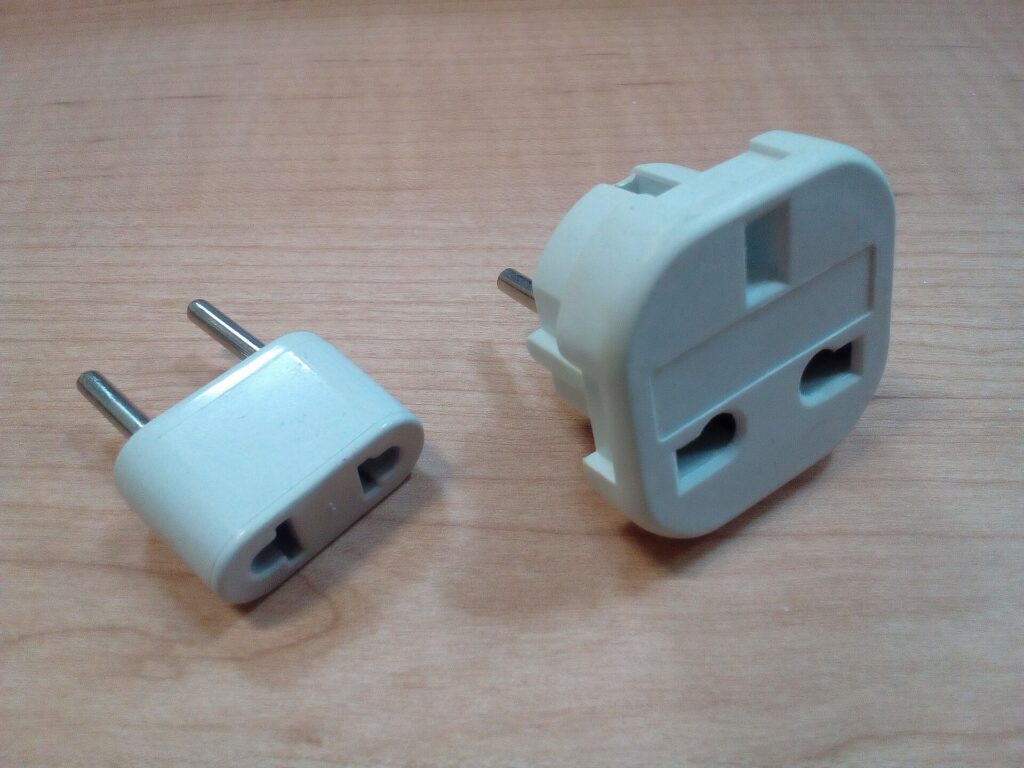
9. Universal travel adapter
Plug shapes differ around the world, and an adapter lets your laptop charger fit a foreign outlet. A universal adapter with sliding pins covers many plug types in one block and often adds USB ports for phones and watches. Two things matter more than the number of countries on the box:
- An adapter is not a voltage converter. It changes the plug shape, not the electricity. Most laptop and phone chargers are designed for a wide input range; Apple, for example, says its USB power adapters are designed for 100 to 240 volts. Check the input rating printed on your own charger before you rely on this. Hair dryers and other heating appliances are a different story.
- Choose a solid, well-made adapter. A laptop charger is heavy, and a cheap adapter can sag out of the wall or fit loosely. An adapter with a safety shutter and a fuse is worth the small extra cost.
If you travel with several devices, a single multi-port USB-C charger with interchangeable plug heads can replace several bricks and an adapter at once.
10. Compact wireless mouse
A trackpad is fine for an hour, but a small mouse makes long sessions of spreadsheets, design work or editing much more comfortable. Travel mice are smaller than desk mice and often connect by Bluetooth, which saves a USB port and removes the tiny receiver that is so easy to lose. Rechargeable models avoid carrying spare batteries. Look for one that fits your hand without cramping, has an on-off switch so it does not drain in your bag, and works on the surfaces you will actually use, such as glossy hotel desks.
Comparison: which accessories matter for which trip
| Accessory | Weekend or city break | Business trip | International trip | Long-term remote work |
|---|---|---|---|---|
| Laptop backpack or bag | Useful | Essential | Essential | Essential |
| Slim sleeve | Essential if no laptop bag | Useful | Useful | Useful |
| Folding stand | Optional | Useful | Useful | Essential |
| Laptop power bank | Optional | Useful | Useful | Useful |
| Water-resistant bag | Useful | Useful | Useful | Useful |
| Anti-theft backpack | Useful in busy cities | Optional | Useful | Useful |
| Cable pouch | Useful | Essential | Essential | Essential |
| Cooling pad | Rarely needed | Rarely needed | Hot climates | Powerful laptops |
| Travel adapter | Only abroad | Only abroad | Essential | Essential abroad |
| Compact mouse | Optional | Useful | Useful | Essential |
Flying with a laptop, chargers and batteries
Laptops, chargers and power banks all contain or depend on lithium batteries, which are regulated in aviation because a damaged or short-circuited battery can overheat. The details are set by each authority and airline and can change, but the principles are consistent:
- Keep the laptop with you in the cabin. Devices with installed batteries are allowed in the cabin, and keeping them there also protects them from theft and rough handling.
- Power banks and spare batteries are cabin only. They are not allowed in checked baggage. If your bag is gate-checked or taken at the aircraft door, take the power bank and any spare batteries out first.
- Watt-hours decide what is allowed. Most phone and laptop batteries and power banks fall under the common 100 Wh threshold. Larger batteries usually need airline approval, and there is an upper limit beyond which they are not allowed as passenger baggage.
- Protect the terminals. Keep spares in their packaging, a case or a separate plastic bag, away from keys and coins.
- Your airline may be stricter. Some airlines have added their own limits on using or charging power banks during flights. Check the airline’s page as well as the government rules.
- Damaged batteries stay home. A swollen, cracked or recalled battery should not fly.
Read the official pages before you fly: the FAA’s PackSafe guidance on lithium batteries, the TSA’s power banks entry and its What Can I Bring? tool, and CATSA’s guidelines for batteries for Canadian airports. Transport Canada also has a plain-language explainer on travelling with lithium batteries.
Getting through security smoothly
Laptop screening rules vary by airport, checkpoint and screening program. Some checkpoints still ask you to remove laptops and place them in a separate bin; newer screening lanes and some trusted traveler programs let them stay in the bag. Pack so either works:
- Laptop in its own compartment near the top or back of the bag, so it slides out in one move.
- Cables in the pouch, not wrapped around the laptop.
- Power bank in an outside pocket in case officers want to see it.
- Take off smart watches and put phones in the bag or bin before you reach the belt, so you are not the person holding up the line.
- Watch your laptop come out of the scanner. The belt is one of the easiest places to leave a laptop behind or have it picked up by someone else.
Working on the road: making a hotel room or café into an office
With a stand, a mouse and a keyboard, almost any table becomes a reasonable workstation. A few habits make it work better:
- Choose the room for the work. If you need to work from the hotel, look for a room with a real desk and a proper chair, and ask about Wi-Fi quality. Our business travel hotels guide explains what to look for.
- Carry a short extension or small multi-outlet charger. Hotel outlets are often behind the bed or far from the desk.
- Bring your own sound. Cafés, airport gates and planes are noisy; our guide to noise-cancelling headphones for flying covers how to choose a pair for calls and focus.
- Protect the screen from eyes. A privacy screen filter narrows the viewing angle so the person next to you on the plane cannot read your email.
- Treat public Wi-Fi with caution. Stick to secure sites, use your company’s security tools if you have them and avoid sensitive logins on networks you do not trust.
Worth adding beyond the top ten
- A travel keyboard. If you use a stand, or you want to work from a tablet instead of a laptop, a folding or slim Bluetooth keyboard completes the setup. See our guide to travel keyboards.
- A multi-device charger. If you carry an iPhone, an Apple Watch and AirPods, a 3-in-1 Apple charger cuts three chargers down to one.
- A rolling laptop bag. If your tech bag is heavy and your trips are mostly airports and offices, a rolling laptop bag takes the weight off your shoulders.
- A cable lock. Useful in coworking spaces, shared offices and hostels, as long as your laptop has a lock slot or you use an adapter designed for it.
- A small USB-C hub. Many thin laptops have few ports. A compact hub adds HDMI for hotel TVs and meeting-room screens, plus USB-A for older accessories.
Before the trip: a laptop checklist
- Back up your files to the cloud or an external drive before you leave.
- Update the operating system and apps at home, not on hotel Wi-Fi the night before a presentation.
- Download what you need offline: documents, maps, entertainment and boarding passes.
- Turn on device encryption and a strong password, and make sure you can locate or wipe the laptop remotely.
- Charge everything, including the power bank, the mouse and the keyboard.
- Pack the cable pouch from a list, and check it again when you leave each hotel.
- Photograph the serial number of your laptop and keep a copy of the receipt, in case you need to report a loss or make an insurance claim.
Common mistakes
- Checking the laptop or power bank. Laptops belong in the cabin, and spare batteries are not allowed in checked bags at all.
- Buying a sleeve by screen size alone. Measure the laptop.
- Assuming an adapter converts voltage. It does not. Check the input range on the charger itself.
- Carrying a phone power bank for a laptop. Check the USB-C output wattage before you depend on it.
- Leaving cables behind. Hotel rooms are full of forgotten chargers. A single pouch and a quick check at checkout prevent it.
- Working hunched over for a week. A stand and a separate keyboard or mouse are small, light and make a big difference.
- Relying on seat power. Not every plane has working outlets, and many that do deliver limited power. Arrive fully charged.
Frequently asked questions
What are the most important laptop travel accessories?
A padded sleeve or laptop bag, a plug adapter for international trips and a cable pouch cover most travelers. A laptop-capable power bank, a folding stand and a compact mouse are the next most useful.
Can I bring a laptop power bank on a plane?
Yes, in your carry-on. Power banks are not allowed in checked baggage. Most fall under the common 100 Wh threshold; larger ones generally need airline approval. Check the FAA, TSA or CATSA pages linked above and your airline’s policy.
Do I need a voltage converter for my laptop abroad?
Usually not. Most laptop chargers accept a wide range of input voltages, so a plug adapter is enough. Check the input rating printed on your charger to be sure.
Is a laptop cooling pad worth taking on a trip?
For most laptops and most trips, no. Keeping the vents clear and using a hard, flat surface is enough. Cooling pads make more sense for powerful laptops or very hot rooms.
Should I use a laptop sleeve inside a laptop backpack?
It is not necessary if the backpack has a well-padded, suspended laptop compartment, but a sleeve adds protection and lets you carry the laptop on its own at your destination.
Do I need to take my laptop out at airport security?
It depends on the checkpoint and your screening program. Pack the laptop so it can come out quickly, and follow the officers’ instructions.
How can I keep my laptop safe from theft while traveling?
Keep it in the cabin, never leave it unattended at a café or gate, use a bag with lockable or hidden zippers in busy places and lock it in the room safe or your locked luggage when you go out without it.
With your kit packed, the only thing left is the trip itself. Compare fares on our flight search, find a hotel with a real desk and reliable Wi-Fi on our hotel search, and if your work trip needs wheels, check our car rental search. Heading to a conference or client meeting in Chicago? Our guide to things to do in Chicago helps you make the most of the evenings, and flights to Chicago are a good place to start. For bags, suitcases and the rest of your gear, return to our main guide to travel luggage.
Keep planning with TicketScanner
- Top travel luggage bags: the buying guide — the travel gear guide
- Rolling laptop bags for business travel
- Travel keyboards for working on the road
- 3-in-1 Apple chargers for travel
- Anti-theft backpacks for travel and commuting
- Peak Design Travel Backpack 45L and carry-on travel packs
- Noise-cancelling headphones for flying
- Business travel hotels guide
- Search hotels — find a room with a real desk
- Things to do in Chicago